Configuration forms
Auto-generate node configuration forms from JSON Schema.
FlowDrop automatically generates configuration forms from JSON Schema definitions. This guide covers static schemas, dynamic runtime forms, and layout control.
Overview
FlowDrop provides three ways to define configuration forms for nodes:
| Approach | When to use |
|---|---|
Static configSchema | Fields are known ahead of time |
Dynamic configEdit.dynamicSchema | Fields depend on external data or user selections |
External configEdit.externalEditLink | Configuration is managed by a 3rd-party system |
All three approaches can be combined — FlowDrop tries the dynamic schema first, then falls back to the static schema if the fetch fails.
Quick Start
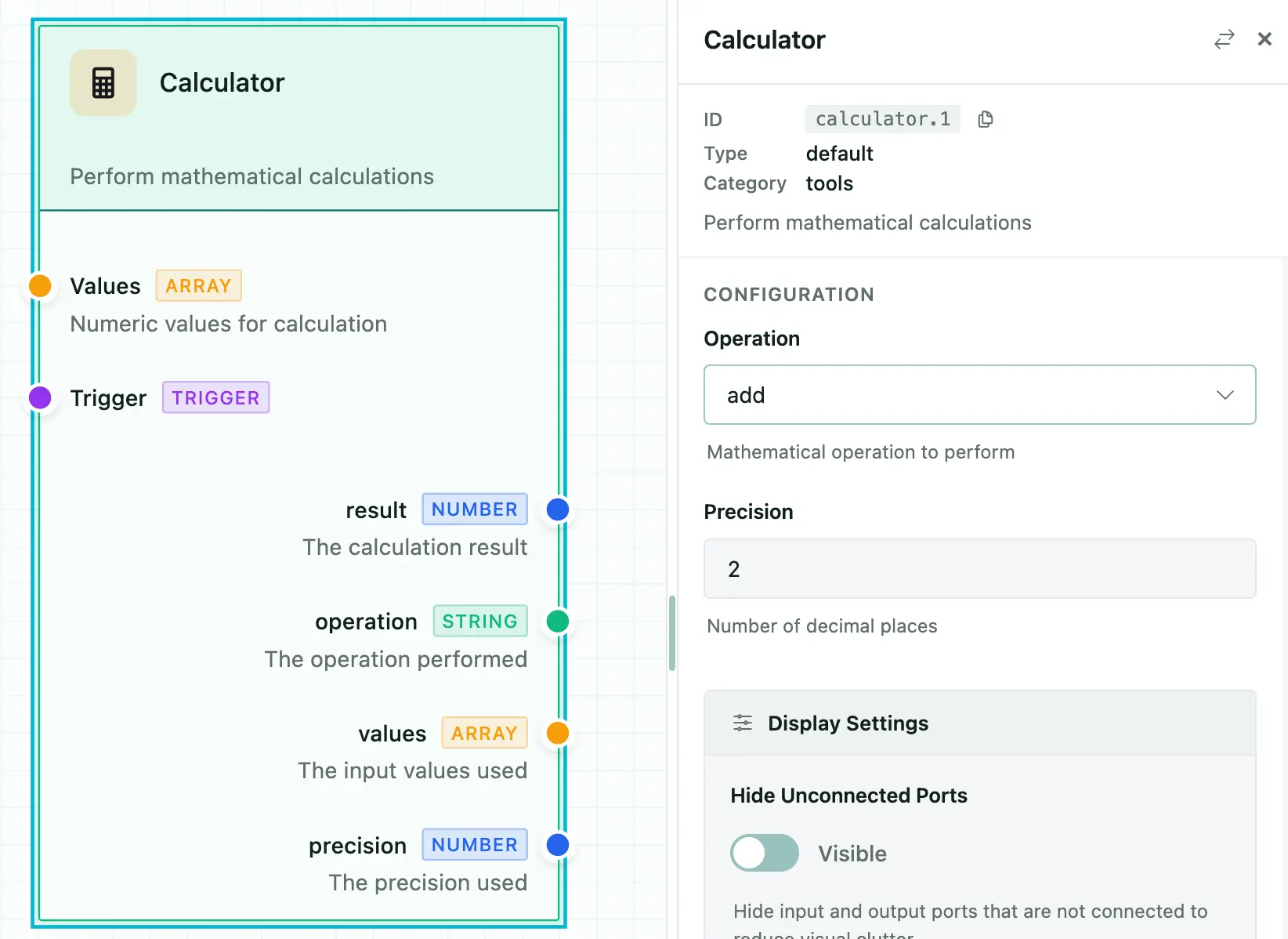
Define configSchema on your node metadata. FlowDrop auto-renders the form:
{
  "id": "calculator",
  "name": "Calculator",
  "configSchema": {
    "type": "object",
    "properties": {
      "operation": {
        "type": "string",
        "title": "Operation",
        "description": "Mathematical operation to perform",
        "default": "add",
        "enum": [
          "add",
          "subtract",
          "multiply",
          "divide",
          "power",
          "sqrt",
          "average",
          "min",
          "max",
          "median",
          "mode"
        ]
      },
      "precision": {
        "type": "integer",
        "title": "Precision",
        "description": "Number of decimal places",
        "default": 2
      }
    }
  },
  ...
}
Field Types and Formats
Basic Types
type | Renders as |
|---|---|
string | Text input |
number | Number input |
integer | Integer input |
boolean | Toggle switch |
array | Repeatable field list |
object | Nested fieldset |
Format Overrides
Use format to change how a field renders:
| Format | Renders as | Notes |
|---|---|---|
multiline | Textarea | Multi-line text input |
hidden | Nothing | Stored in config but not shown in UI |
range | Slider | Requires minimum and maximum |
json | CodeMirror editor | JSON syntax highlighting and validation |
code | CodeMirror editor | Alias for json |
markdown | Markdown editor | Toolbar and preview |
template | CodeMirror editor | {{ variable }} autocomplete |
autocomplete | Text input + suggestions | Fetches options from API |
Example
{
  "type": "object",
  "properties": {
    "prompt": {
      "type": "string",
      "title": "Prompt",
      "format": "multiline"
    },
    "temperature": {
      "type": "number",
      "title": "Temperature",
      "format": "range",
      "minimum": 0,
      "maximum": 2,
      "default": 0.7
    },
    "metadata": {
      "type": "object",
      "title": "Metadata",
      "format": "json"
    },
    "internalId": {
      "type": "string",
      "format": "hidden"
    }
  }
}
Select Fields
Simple Enum
{
  "model": {
    "type": "string",
    "title": "Model",
    "enum": ["gpt-4o", "gpt-4o-mini", "claude-3"],
    "default": "gpt-4o-mini"
  }
}
Labeled Options with oneOf
{
  "status": {
    "type": "string",
    "title": "Status",
    "oneOf": [
      { "const": "pending", "title": "Pending" },
      { "const": "in_progress", "title": "In Progress" },
      { "const": "completed", "title": "Completed" }
    ]
  }
}
Multi-Select (Checkboxes)
{
  "tags": {
    "type": "string",
    "title": "Tags",
    "enum": ["urgent", "review", "archive"],
    "multiple": true
  }
}
Autocomplete Fields
Fetch suggestions from a remote API as the user types:
{
  "userId": {
    "type": "string",
    "title": "User",
    "format": "autocomplete",
    "autocomplete": {
      "url": "/api/users/search",
      "queryParam": "q",
      "minChars": 2,
      "debounceMs": 300,
      "labelField": "name",
      "valueField": "id",
      "allowFreeText": false,
      "fetchOnFocus": true
    }
  }
}
Template Fields
Template fields provide CodeMirror editing with {{ variable }} syntax highlighting and autocomplete from connected node outputs:
{
  "prompt": {
    "type": "string",
    "title": "Prompt Template",
    "format": "template",
    "variables": {
      "ports": ["data", "context"],
      "showHints": true
    }
  }
}
UISchema Layout
By default, fields render in property order. Use uiSchema to control layout and grouping — inspired by JSON Forms:
{
  "type": "VerticalLayout",
  "elements": [
    { "type": "Control", "scope": "#/properties/name" },
    { "type": "Control", "scope": "#/properties/model" },
    {
      "type": "Group",
      "label": "Advanced Settings",
      "collapsible": true,
      "defaultOpen": false,
      "elements": [
        { "type": "Control", "scope": "#/properties/temperature" },
        { "type": "Control", "scope": "#/properties/maxTokens" }
      ]
    }
  ]
}
Element Types
| Type | Description |
|---|---|
Control | Renders a single form field. scope is a JSON Pointer to the property. |
VerticalLayout | Stacks child elements vertically. |
Group | Wraps elements in a collapsible fieldset with a label. |
Special Config Properties
Certain property names trigger automatic behaviors:
| Property | Type | Behavior |
|---|---|---|
instanceTitle | string | Overrides the node's displayed title |
instanceDescription | string | Overrides the node's displayed description |
instanceBadge | string | Overrides the node's badge |
nodeType | string | Switches visual rendering type |
dynamicInputs | DynamicPort[] | Creates user-defined input handles |
dynamicOutputs | DynamicPort[] | Creates user-defined output handles |
branches | Branch[] | Creates conditional output paths (gateway nodes) |
Dynamic Schema (Runtime)
Use configEdit.dynamicSchema to fetch config schemas from your backend at runtime:
const myNode: NodeMetadata = {
  node_type_id: 'dynamic-processor',
  name: 'Dynamic Processor',
  configEdit: {
    dynamicSchema: {
      url: '/api/nodes/{nodeTypeId}/schema',
      method: 'GET',
      parameterMapping: {
        nodeTypeId: 'metadata.node_type_id'
      },
      cacheSchema: true,
      timeout: 10000
    },
    showRefreshButton: true
  },
  // Fallback static schema
  configSchema: {
    type: 'object',
    properties: {
      apiKey: { type: 'string', title: 'API Key' }
    }
  }
};
The dynamic schema endpoint should return a JSON Schema object. Multiple response shapes are accepted:
- Direct schema:
{ type: "object", properties: {...} } - Wrapped:
{ data: {...} }or{ schema: {...} } - With UISchema:
{ configSchema: {...}, uiSchema: {...} }
External Edit Links
For configuration managed by a 3rd-party system:
configEdit: {
  externalEditLink: {
    url: 'https://admin.example.com/nodes/{nodeTypeId}/configure',
    label: 'Configure in Admin Portal',
    icon: 'mdi:open-in-new',
    parameterMapping: {
      nodeTypeId: 'metadata.node_type_id'
    },
    openInNewTab: true
  }
}
Standalone ConfigForm
You can render the ConfigForm component independently in svelte projects:
<script>
  import { ConfigForm } from '@flowdrop/flowdrop/editor';

  const schema = {
    type: 'object',
    properties: {
      name: { type: 'string', title: 'Name' },
      email: { type: 'string', title: 'Email' }
    },
    required: ['name', 'email']
  };

  let values = $state({});
</script>

<ConfigForm
  {schema}
  {values}
  onChange={(config) => {
    values = config;
  }}
  onSave={(config) => {
    /* persist */
  }}
/>